









Paying your invoice online is changing

By Therapy Focus
From 1 December, there will be a small change to how you pay your Therapy Focus invoice online by credit card.
What stays the same
- We will still email you your invoice
- Your invoice will be a PDF attached to the email
- The invoice will have a link. You can click the link to pay online
- Your credit card details are not stored.
What is different
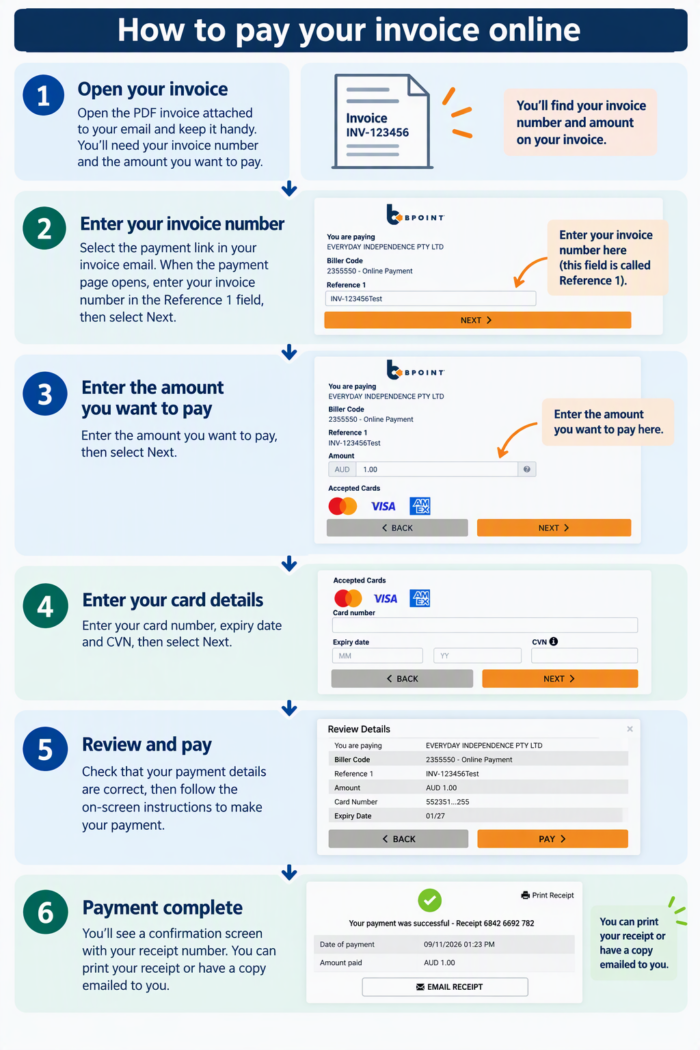
When you click the link to pay, you will need to type in:
- your invoice number
- the amount you need to pay.
You can find these on your invoice. Before you click the link, write down your invoice number and the amount. You can also copy and paste them if you know how.
How to pay your invoice online
This guide below shows you what to do, step by step.
After you pay
- You will get a receipt number
- You can print your receipt
- Or you can ask for a copy to be emailed to you.
You do not need to do anything now
We are telling you early. This way, you will know what to expect the next time you pay online.
Have questions?
If anything is still unclear, we’re always here to help. Please reach out to our team on 1300 135 373 or email us and we’ll gladly talk you through your invoice.
By Therapy Focus
Last Updated 19 Nov 2026